Table of Contents
The Promise and the Catch
To find out if there really was a POS system available for free, well, the answer is yes, but under certain circumstances. There’s indeed such a thing as a free POS system, but it’s available only to qualifying merchants who meet transaction-volume requirements and open a new merchant account through a provider. The equipment, say a Clover Mini, will either get a discount or possibly be provided for free as part of the deal. But there usually are limitations on what exactly qualifies for this offer.
Free hardware placement and no upfront cost lowers the barriers for small business owners that want to move to modern checkout technologies like touch-screen register systems, but there’s a catch: most of these providers make money on payments processing charges, transactions fees or referral commissions. And you may have to purchase some basic features to upgrade out of the free tier including employee scheduling and inventory management. Many free point-of-sale providers won’t allow a merchant to utilize another third party processor, forcing them to process payments via the software vendors’ proprietary processing service. Read up on how providers make their money before deciding whether they’re really offering anything free or not.
Key Takeaways
- Many owners ask, is there a free POS system that actually works?
- There appears to be another name mentioned whenever there was a discussion about POS software: Square.
- Another major restaurant-focused POS player entering the field with a free tier is called Toast.
- Loyverse is a free point-of-sale system that appeals to budget-conscious businesses, but its revenue model relies on paid add-ons and mandatory payment processing.
- Lightspeed is often considered a cloud-based point-of-sale solution evaluated by restaurant owners who are weighing lightweight versus full-featured systems.
Clover
Many owners ask, is there a free POS system that actually works? Through our program, qualifying new merchants can receive discounted or even free Clover hardware, including the Clover Station valued at $1,299. We’ve helped thousands of businesses upgrade their operations without the upfront cost barrier.
The system’s lineup is designed as one-stop shopping solution for restaurant owners and store clerks alike. the Station can handle everything from inventory management to employee timesheets and reports, as well as print documents all in one place from its single-countertop location. All payment methods such as credit cards, debit cards, EMV chips, and even NFC contactless payments via the Apple Watch and various mobile wallets, among others, can be accepted through this station. This makes it suitable for both curbside pick-up orders and deliveries. Its POS software starts at $99.95 but offers options such as next-day deposits and QuickBooks integration that make running day-to-day business much easier. In addition to these tools, the system will work alongside barcode scanners and kitchen display systems to improve efficiency.
Qualifying for discounted hardware is straightforward but comes with clear terms. To get this discount on hardware, customers need to obtain just one mini unit or any other product from that line at a discounted rate per new customer. Wholesale processing rates apply, with no setup fees or cancellation fees. The goal is to help businesses modernize their payment processing while keeping costs predictable.
Square
There appears to be another name mentioned whenever there was a discussion about POS software: Square. The platform offers a free basic software package many small businesses use to get started, but it’s designed with a freemium model in mind. Advanced features—such as detailed inventory tracking, employee scheduling, and advanced reporting—are locked behind paid upgrades, which effectively nudges growing businesses toward higher tiers.
Free POS companies usually monetize by requiring payment processing and charging transaction fees, rather than by charging for the software itself. This means the "free" portion might cost you later, as you pay additional processing fees. Further still, many "free" POS providers require merchants to use the software provider’s proprietary payment processor.
If you meet certain qualifications, there are programs out there that will either give you the POS equipment for free or at a discount, which may provide a more cost-effective path than relying solely on Square’s free software. In the end, comparing how much it would have all totaled up front would help determine which method would save you money over time. Though in theory, if they could get their business off the ground using a free account, eventually the costs associated with expanding beyond its limits would add up quickly.
Square isn’t the only restaurant-focused or freemium option to consider when evaluating free POS platforms.
Toast
Another major restaurant-focused POS player entering the field with a free tier is called Toast. This appeals to owners who want to save money on their initial investment for this type of technology. Just like any other provider that gives out the service for free, Toast has some limits in terms of features available with its free version. Some examples include the absence of detailed reports, payroll integration and kitchen display systems, which are paid for at higher price points.
Most importantly is how the platform makes money. Typically, it follows the trend for most other POS systems and acts as the merchant service provider, taking a percentage of each credit card transaction processed through its system. That way, there is a steady flow of money coming in from transactions, rather than paying for expensive software up-front. However, there is a downside to using the free tier, which is that restaurants are stuck inside its payment processing network. They won’t have access to many essential tools in the free version, which could result in having to upgrade to paid plans if they need the features. Before committing to any platform, review the revenue model for the provider, including what type of processing is required and what kinds of features are restricted. Hidden costs can quickly accumulate. For example, some free POS solutions don’t allow third party payment processors. Therefore, businesses will be forced to pay the fees charged by the software vendor’s proprietary processing service. Other providers, such as Loyverse, require merchants to buy additional products to get everything working properly.
Loyverse
Loyverse is a free point-of-sale system that appeals to budget-conscious businesses, but its revenue model relies on paid add-ons and mandatory payment processing. We recommend evaluating whether the free tier meets your operational needs before committing, as essential tools like employee scheduling and time clocks often sit behind paid tiers. Free POS providers typically monetize through several mechanisms: they may require businesses to use proprietary payment processing with transaction fees, earn referral commissions by directing users to third-party processors, or restrict core features, such as product limits or transaction caps,behind paid subscriptions.
Here’s what you should think about when deciding whether to go for Loyverse as well as another free point-of-sale solution.
- Hardware compatibility with your existing setup
- Payment processing terms and any transaction fees
- Which features are locked behind paid tiers
- Whether the free tier’s limitations align with your business volume
Much like the other free options, Loyverse reveals that a truly cost-free solution is rare once you look at all of the additional charges and required add-ons and processing fees.
Lightspeed
Lightspeed is often considered a cloud-based point-of-sale solution evaluated by restaurant owners who are weighing lightweight versus full-featured systems. The software targets companies prioritizing inventory tracking and reports from multiple store locations. Whenever buyers ask whether there’s a free POS system for them, it usually means looking at all hardware requirements as well as ongoing fees across companies.
Evaluating any POS platform starts with confirming the provider’s current packages, pricing tiers, and qualification requirements. Restaurant operators should verify whether a system supports essential functions like payment acceptance (credit, debit, EMV chip, and NFC contactless payments) and whether hardware discounts apply to new merchant accounts. These details vary by provider and can shift based on business volume and contract terms. Because offerings and availability change frequently, it’s important to confirm specifics directly with the provider before making a decision. This ensures you select a solution that aligns with your operational needs and budget expectations.
Should you be using Lightspeed, or some other system, please contact us to confirm availability and qualify for discounted hardware tailored to your restaurant’s needs.
PayCafe
There’s another option that might make sense here called PayCafe. Much like any point of sale platform, it makes most sense when we’re looking at its total cost of ownership, including the hardware and paying for the payment processor as well as the software itself. It also needs good quality hardware and to be set up properly on a solid payment gateway to ensure things run smoothly while also protecting from fraud or downtime.
Key factors in comparing PayCafe include hardware cost, licensing fees and payment processing fees. A good terminal should accept all payment types that most merchants currently require such as EMV chips, magnetic stripe readers, and NFC readers. This allows merchants to handle transactions as customers prefer while still meeting current industry standard requirements. Many providers also offer month-to-month leasing options for merchants who may prefer this option over a long term lease agreement. Our team qualifies merchants for free or discounted hardware placements based on processing volume and credit history. Once approved, merchants can start processing payments quickly and access dedicated support to keep their systems secure and up to date.
Understanding how these platforms are monetized helps you choose the right fit for your business.
How the Money Is Really Made
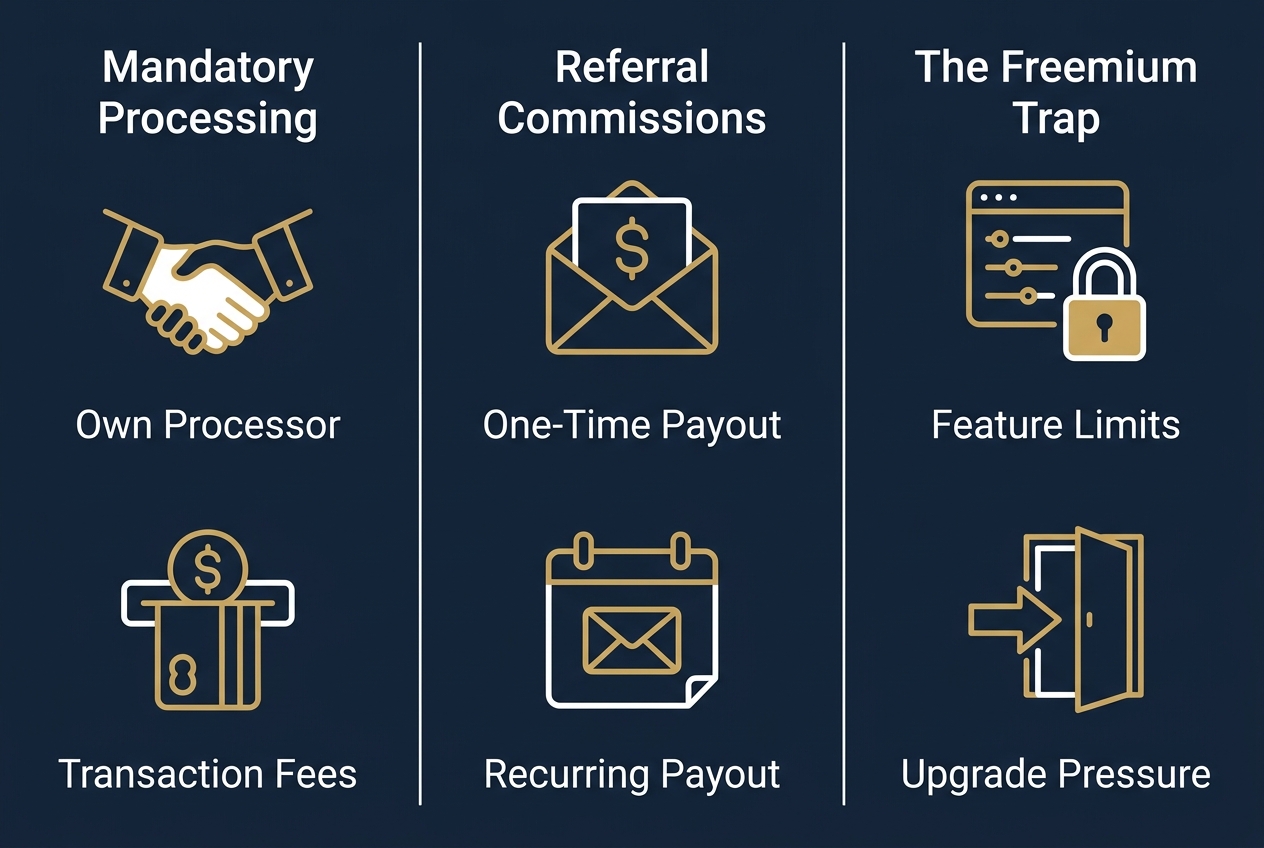
So, is there a free POS system that costs nothing in the long run? The simple response is no: providers rely on three core revenue models to offset the cost of free hardware and software. These models shape what you can actually do with the system and how much you’ll pay over time.
Mandatory Processing
In the U.S., many free POS providers will require merchants to run all their transactions through their payment processor. This means that they get to make money on each and every single sale made using the service, which explains how these providers can offer something for nothing.
Referral Commissions
In addition to processing transactions, some service providers might earn referral commissions from third-party processors or other partners by directing merchants to them. This is included in their recommendations, which means the guidance you receive may be financially motivated.
The Freemium Trap
Freemium POS programs often don’t offer full access to their functionality until customers pay for extra modules. This means basic employee scheduling may require a paid add-on on some platforms, while free tiers of widely used systems lack advanced tools that force a move to a paid plan.
Features, Security, and Limitations
After you figure out exactly how POS machines make their money, you can then start to think about how a free POS might benefit your company versus all the drawbacks that come along with having a free version.
What Free Systems Cut
Free point of sale software does not contain all the things you would expect to see in order for your business to run properly. Free versions will often neglect scheduling, reporting and the ability to track the inventory levels of multiple locations. Hardware is sometimes provided without any charge, but businesses may still face hidden costs for add-ons or upgrades to access those core functions.
Keeping Card Data Safe
In order for card transactions to be secure you must have hardware that can read EMV chips as well as handle both magnetic strips and contactless NFC payments. It is recommended that you audit the hardware used within your current payment network to ensure all is compatible prior to any upgrade being carried out. The modern day terminals such as the Verifone VX520 and the mini terminal include lifetime warranties and process Apple Pay, Google Pay, and even Apple Watch transactions safely. Employee training around the issue of EMV verification and phishing could also help reduce risk.
Choosing Free or Paid
It depends what kind of business operations and goals you have. If you’re going to be processing large amounts of transactions or if you want to integrate all-in-one features such as inventory, reporting, etc., then maybe paying for the the Station application will make sense since this application provides these capabilities. It has some cheaper hardware options for merchants who qualify that don’t require long term contracts. Thus the cost only goes up depending upon how many things you use versus setting yourself into rigid terms.
Frequently Asked Questions
Are there truly free POS systems or are there hidden costs?
Free POS systems exist but are not entirely cost-free. Providers offer free or discounted hardware to qualifying merchants who open a new merchant account. However, they typically monetize through mandatory payment processing fees, referral commissions, or freemium models that restrict essential features behind paid tiers.
What are the limitations of using a free POS system for my business?
Free POS systems often limit access to core business tools such as employee scheduling, advanced inventory tracking, detailed reporting, and kitchen display systems. These features are frequently locked behind paid upgrades, restricting functionality for growing businesses.
Do free POS systems include payment processing fees?
Yes, most free POS systems include payment processing fees. Providers typically require merchants to use their proprietary payment processors, which charge transaction fees on every sale processed through the system.
Is a free POS system secure enough for handling customer credit card data?
Free POS systems can be secure if they support modern payment technologies like EMV chip, magnetic stripe, and contactless NFC payments. However, security also depends on proper hardware selection, compliance with PCI DSS standards, and staff training on EMV verification and phishing threats.
How do I choose between a free POS system and a paid platform that offers more features?
Choose based on your business needs and transaction volume. Free systems may suit small operations with low transaction counts, but paid platforms often provide comprehensive tools like advanced reporting, inventory management, and payroll integration. Compare total costs, including hardware discounts, processing fees, and required add-ons.
Making the Free-vs-Paid Call
is there a free POS system that’s really worth having? It depends on how much business you have and if you want to enter into a new merchant processing agreement. Any kind of ‘free’ POS will offset its costs via their merchant account agreement, but isn’t exactly gratis.
Merchants must meet certain requirements to claim free equipment: High-volume merchants can qualify for free Flex handheld units or mini all-in-one units, while SmartSwipe mobile customers can access hardware rebates that wipe out upfront costs. In other words, there’s only room for one discounted mini unit or equivalent system per new customer.
Many novices have chosen a POS software package for their businesses incorrectly. If you’re looking for help in making this decision, give us a call. Our wholesale processing rates come with no setup fees and no cancellation fees, reducing the risk of committing to an agreement that doesn’t fit your business.
Clicking on ‘Get Pricing’, you agree to receive marketing messages in terms of call and/or SMS. Please be advised that shipping carriers might experience delays, and we disclaim liability for any carrier delays.
Check Your Free POS Eligibility
You’ve now seen how the top free POS options compare, from Square’s freemium upgrade path to Toast’s processing model and Clover’s hardware programs. The key takeaway is that eligibility for free or discounted hardware depends on transaction volume and a new merchant account agreement. With no setup fees or cancellation fees on many offers, weighing your options carries little risk. Remember that a reported 38% of new business owners choose the wrong POS system for their startup, which is why expert guidance matters. Our team can walk you through qualification terms and help you compare total cost of ownership across platforms. Review the detailed qualification requirements and program terms before you commit. Check qualification requirements to see whether you qualify.