Table of Contents
What Is POS? Understanding Point-of-Sale Systems
What’s POS? A point-of-sale (POS) system combines all the hardware and software needed for a business to process transactions from customers, monitor its stock levels, and keep track of its income. Rather than being a basic cash register, modern POS solutions offer integrated features such as reporting, customer relationship management, and payments handling in one package. A customer can pay at a counter using a plastic card, tap their phone to make a contactless payment when shopping at a pop-up stall, or checkout from home on the internet, but whatever happens during each stage of the sale is orchestrated by the POS system.
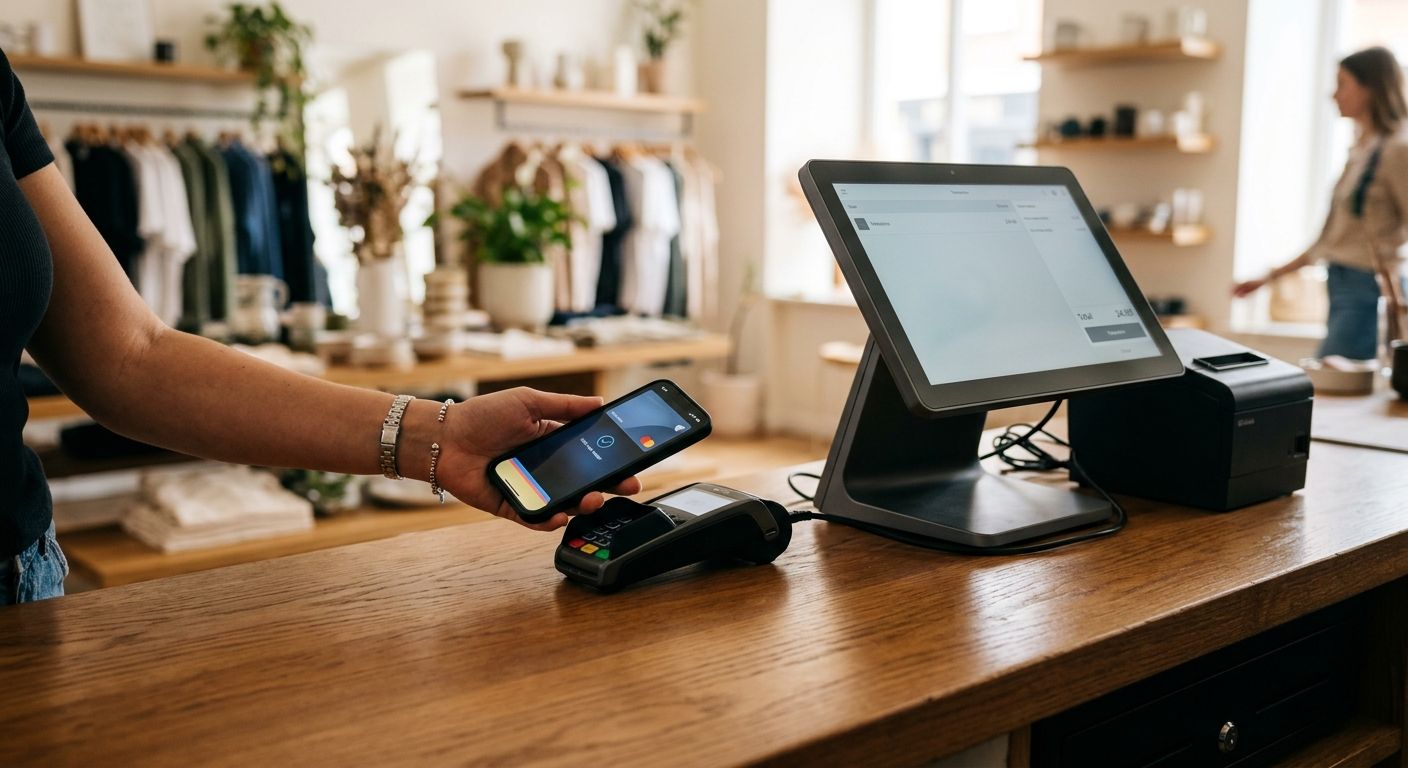
Previously, point-of-sale setups relied on fixed terminals and dedicated card readers. The U.S. Payments Forum says that mPOS and tap-to-mobile solutions instead make use of standard consumer devices like smart phones and tablet computers. By using their internal near field communication chips, tap-to-mobile systems enable them to accept contact-less payment card information without requiring additional card readers, allowing those merchants who might be out on location or moving around to take care of transactions more quickly and conveniently.
The wrong choice of POS system can cost more money than necessary, cause problems with workflow, and frustrate customers, issues that could have been avoided with good advice. According to The POS Brokers, about 38 per cent of new business owners choose systems that don’t meet their operational needs.
Understanding what a POS system is at its core lays the groundwork for examining its essential components. As your partner for better payment processing, we help you move from a clear definition to a fully integrated solution that supports your business’s unique requirements.
Key Takeaways
- According to PCI SSC, a payment terminal includes all types of devices that allow swiping, dipping, tapping, or manually entering cards.
- In order to put together a point-of-sale system, you need more than just knowledge about how things work.
- Here are steps to implement an operational point-of-sale program: Configuring the hardware & software, initiating transactions & synchronizing inventory.
- Total POS investments include costs for the equipment itself as well as software plus payment processing costs.
- Choosing the right payment processing partner can streamline operations and cut costs.
Core Components of a POS System
Hardware: The Physical Foundation
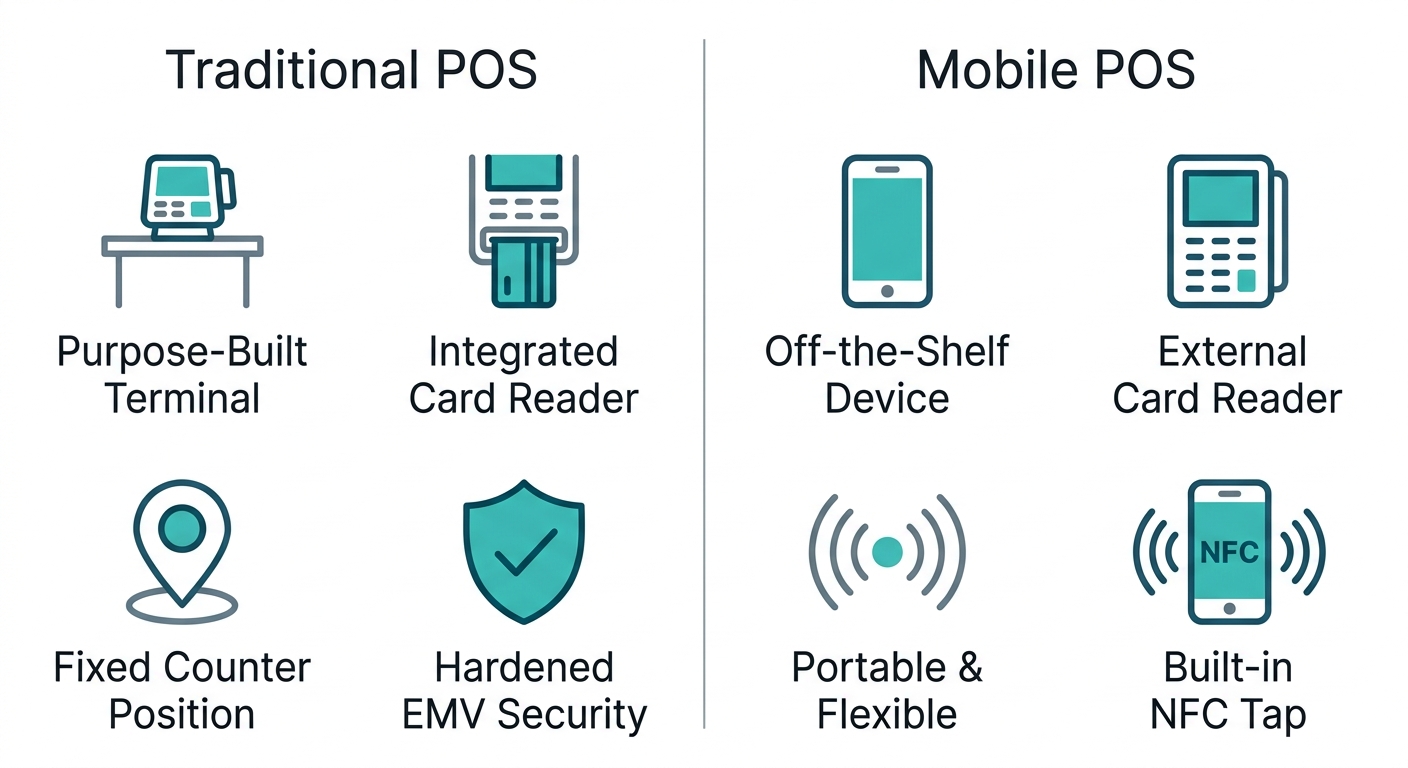
According to PCI SSC, a payment terminal includes all types of devices that allow swiping, dipping, tapping, or manually entering cards. An Electronic Cash Register is a type of system that records only the sale amount and does not capture or transmit cardholder data. Most traditional point-of-sale (POS) solutions were designed using purpose-built payment terminal hardware, complete with an integrated card reader. A mobile Point-of-Sale, or mPOS system allows you to use your commercial off-the-shelf Smartphone or Tablet with a PCI compliant card reader. Tap to Mobile solutions make use of their device’s NFC antennas in order to support the processing and acceptance of contactless payments.
Traditional vs. Mobile POS Comparison
| Traditional POS | Mobile POS (mPOS) | Key Considerations |
|---|---|---|
| Purpose-built terminals with integrated card readers. | Off-the-shelf device (smartphone/tablet) with a separate card reader. Portable. | Mobility, setup cost; traditional systems suit high-volume fixed counters, mPOS fits pop-ups or small spaces. |
| Higher upfront hardware investment; requires dedicated POS computer. | Lower upfront cost; uses existing consumer device but needs PCI-compliant card reader. | Total cost of ownership — traditional may have lower per-transaction fees. |
| Can include inventory management, employee time-tracking, and reports built in. | Software apps provide many of the same features but may lack advanced retail/restaurant modules. | Feature needs: if you require deep inventory or high-volume order management. |
| Security: hardened terminals; P2PE and EMV chip acceptance standard. | Security: device itself must be managed; CPoC or SPoC standards apply to card readers. | PCI compliance and data protection are mandatory for any POS. |
Software and Security Layers
A POS (point-of-sale) program will run in the terminal itself or be linked up with a tablet or computer for users like yourself and customers during their transactions. Some common parts that you might find in the software are order management, inventory tracking, sales reports, and employee management. Each and every single POS has at least a payment processor which can come built-in to the terminal or else set up as an independent gateway to allow it to handle card payments.
From a security perspective, P2PE solutions encrypt card data at the moment of interaction to minimize exposure if a device or network is compromised. The PCI Security Standards Council publishes mobile security standards such as CPoC and SPoC for COTS-based solutions; these define acceptable methods for PIN entry and contactless acceptance on consumer devices. Additionally, L3 EMV certification verifies end-to-end integrity of the payment chain from the card reader through to the application.
Restaurant and Retail POS Systems: Features and Use Cases
In order to put together a point-of-sale system, you need more than just knowledge about how things work. The actual benefits only occur if the hardware and software can be tailored to the needs of individual businesses. Full service restaurants, quick serve food stations and retail shops all have their own processes in which they function, requiring different POS functions.
Hardware Components of a POS System
A basic point-of-sale system often consists of a terminal or tablet, a touchscreen, a printer that produces receipts, and a drawer where money can be stored. Additional gadgets commonly used at restaurants include hand-held tablets on which servers can take orders at diners’ tables, digital displays that replace paper tickets in the kitchen, and touch-screen devices in fast-food outlets that speed up the ordering process. Business owners who buy such equipment should consult their tax adviser because qualifying POS hardware may be eligible for a Section 179 tax write-off that allows the full purchase price to be deducted in the year of acquisition.
Software Features for Restaurants and Retailers
With all your hardware in place, powerful POS software coordinates the many moving parts of a business. The POS Brokers team has seen how tailored software dramatically improves both front-of-house speed and back-office visibility.
| Feature | Full-Service Restaurant | Quick-Service Restaurant | Retail Store |
|---|---|---|---|
| Hardware Components | Table management terminals, handheld mobile devices, kitchen display systems, receipt printers | Durable, speed-focused terminals, self-service kiosks, integrated contactless readers | Barcode scanners, stationary terminals, customer-facing displays, receipt printers |
| Software Features | Table management, detailed menu customization, ingredient inventory tracking, employee shift scheduling | Fast order entry, combo meal builders, upselling prompts, simplified inventory alerts, real-time KDS integration | SKU-level inventory tracking, barcode label printing, cashier management, purchase order management, sales reports by category |
| Payment Processing | EMV chip and contactless acceptance, tableside payment, PCI-compliant P2PE, tip adjustment | Contactless and mobile wallet payments, kiosk payment integration, PCI compliance, rapid transaction flow | EMV and contactless, integrated barcode scanner payment, customer-facing payment displays, gift card processing |
Full-service establishments can monitor ingredient consumption in real-time and provide suggested orders based on sales trends. Quick-service restaurants benefit from rapid transaction flows and simplified dashboards that visualize peak hour performance. Both retail businesses and volume retailers track hundreds or thousands of SKUs using barcode scanners that automatically adjust stock counts with every sale. Multi-location POS systems often have cloud-based reports, enabling those companies to look through all of their sales, labour and inventory information from a single dashboard.
How POS Handles Payment Processing
As soon as the card is shown, the terminal will read from either its EMV chip, or process the NFC swipe for a contact-less payment. After being encrypted, the transaction travels via the merchant’s bank account for authorisation, capturing and settling. The payment terminal directly collects this card information, while the cash register can just record the amount of money exchanged in the transaction. In order to keep the data safe and secure, Point-to-point encryption (P2PE) will scramble the card information as it arrives at the terminal, rendering any stolen card data useless. It is necessary to know that the cardholder data environment isn’t limited to the actual machine, but includes the back office PC, the stock control system, and the network infrastructure, all of which must be kept protected.
All these hardware pieces, along with software features and payment safety procedures, serve as the fundamental parts that restaurant and retail employees handle every day. From inputting orders through the POS machine to accepting credit cards or verifying stock quantities, it makes sure key tasks can be done efficiently on a daily basis.
How to Use a POS System for Daily Operations
Here are steps to implement an operational point-of-sale program: Configuring the hardware & software, initiating transactions & synchronizing inventory. Follow along for more information on each phase needed in order to process transactions and manage your operations effectively.
Setting Up Your POS System
To get ready for POS daily usage there are three parts to this process. First off you want to have all your hardware set up which includes the terminal, cash drawer, barcode scanner, and printer connected to both a power source and internet connection. The second part would be installing your POS software and setting up the different modules you will need including inventory, sales report etc. Last but definitely not least hooking up the system into your merchant account, which allows you to accept payment card transactions from customers. This part we can often complete in one day, and 24/7 support is available if you need help at any stage.
Be patient. Merchant account underwriting can take up to 24-72 hours before processing begins. The processor will review your application for a new merchant account and possibly check your credit (a “soft credit” pull). To avoid potential liability under the EMV fraud liability shift, make sure any credit card readers attached to the merchant account have been configured to process chips. Then run some test transactions for small-dollar amounts to see if everything works correctly when it’s all connected to the merchant account, the payment processor, and the transaction system. Once that process clears, it should be safe to take actual customers’ money.
Daily Transaction Workflow
If a customer has finished shopping and wants to pay, scan the item(s), either using its barcode if it has one or clicking the icon next to each item in the cart. The system will display the sum that needs to be paid. If there’s a discount or tax included, this too should be factored into the total before showing the final bill to the customer. When paying for their purchase, customers may tap a contactless card or mobile payment app, insert an EMV chip card, or enter a PIN for a debit transaction. For certain programs such as EBT, SNAP, and cash back, PIN entry remains mandatory, as noted by the U.S. Payments Forum’s guidance on consumer interactions at the point of sale.
When you authorize this sale, the screen might prompt the guest to join a rewards program, take advantage of financing opportunities, or make a donation, without the long wait times. As soon as you ring up the sale, the register instantly records it, updates your inventory count in real time, and produces a receipt that can be printed or emailed. This system makes sure that every transaction feeds into your daily sales reports and keeps your stock levels accurate from open to close.
Managing Inventory with Your POS
A POS system eliminates manual stock counts by tracking inventory as each sale happens. Every time an item is rung up, the system deducts that quantity from your on-hand count. This real-time visibility lets you see exactly what’s in stock at any moment, across one location or multiple stores. When a product dips below a preset threshold, the POS can trigger a low-stock alert and even suggest a purchase order for your supplier, making replenishment fast and data-driven.
The reporting aspect of the point of sale system turns inventory management from something vague into something specific. It will tell you which items fly off the shelves, what sits there and does nothing, and where most of the waste happens. By knowing this information, you can decide how many more items to order, how much waste to reduce, and which slow movers to remove that tie up cash. Since it ties right into the sales data, you always know what your inventory looks like without needing to make any extra work for yourself with spreadsheets.
Once you’ve gotten used to working at the POS level on an everyday basis, learn more about your different cost structure options as well as how to integrate payments.
POS System Costs and Payment Processing Integration
Total POS investments include costs for the equipment itself as well as software plus payment processing costs. Integration relies on a merchant account that temporarily holds customer payments before they settle in the business bank account. The following table compares standard processing and cash discount program cost structures.
| Aspect | Standard Processing | Cash Discount Program |
|---|---|---|
| Fee Structure | Interchange-plus markup or flat per-transaction fees that the merchant pays per card swipe, covering network, issuer, and processor costs. | Processing fees are shifted to the customer through a surcharge at checkout, leaving the merchant with zero net processing expenses. |
| Qualification Process | Underwriting includes a soft credit check and review of business history, typically completed within 24–72 hours of application. | Requires a specific merchant services agreement and may involve additional review of compliance with surcharging rules and state regulations. |
| Hardware Requirements | EMV chip-capable terminals are mandatory to avoid fraud liability under the EMV liability shift; non-compliance shifts fraud costs to the merchant. | The same EMV requirement applies; additional programming is needed to automatically apply the surcharge at the point of sale. |
| Transaction Testing | Small-dollar test transactions are run to confirm that processing and settlement work correctly before going live with real customers. | Testing also verifies that the surcharge is calculated correctly and that transaction reporting remains accurate after integration. |
| Provider Incentives | Hardware incentives are uncommon; merchants typically purchase terminals outright without equipment subsidies or discounts. | Qualifying new accounts often receive free or heavily discounted Clover equipment, such as a free Clover Station (valued at $1,299), with No Cancellation Fee terms to reduce switching risk. |
In order to avoid these costs, companies have many questions regarding their processing fee, how long it takes them to set up, what kind of hardware they need. These types of concerns should be addressed when you’re looking for a payment processor.
Common Questions About POS Systems
- What mistakes do new business owners make when choosing a POS? We find that 38% of new businesses select an inappropriate system for their needs, which can lead to costly inefficiencies.
- How can I lower credit card processing costs? Eligible merchants can take advantage of our cash discount program that reduces processing fees to 0%.
- Is free or discounted POS hardware really available? Qualifying new merchant accounts can receive hardware incentives like a free Clover Station or a discounted Clover Mini, up to a combined value of $1,299.
- Do contactless payments eliminate all physical interaction? Contactless tap-and-pay and mobile wallets reduce terminal contact, but industry guidance from the U.S. Payments Forum notes that EBT, SNAP, and cash-back transactions require PIN entry. The terminal itself remains a hub for loyalty enrollment, financing applications, and charitable donations.
Partner for Better Payment Processing Solutions
Choosing the right payment processing partner can streamline operations and cut costs. We provide end-to-end consultation, from system selection through installation and training. Our cash discount program helps businesses reduce credit card processing fees, and qualifying customers can receive discounted Clover hardware. For restaurants, full-service systems support table management and handheld devices, while quick-service models offer kiosks and rapid transaction tools. Cloud-based reporting and potential Section 179 tax write-offs add further value. All clients benefit from 24/7 support, no setup or cancellation fees, and a lifetime warranty on qualifying equipment.
FAQ
What is pos
POS stands for point of sale. It is the combination of hardware and software that businesses use to process customer payments, track inventory, and manage sales data. A POS system encompasses terminals, card readers, cash registers, and the software that coordinates transactions and reporting.
What is a pos system
A POS system is the integrated hardware and software that enables businesses to accept payments, monitor stock levels, and generate sales reports. It typically includes a terminal or tablet, a card reader, a receipt printer, a cash drawer, and software for managing orders, inventory, and employees. Modern systems also support reporting and customer relationship tools.
What is a pos system in a restaurant
A restaurant POS system is tailored to the service style. Full-service restaurants use table management, handheld ordering devices, and kitchen display systems. Quick-service restaurants prioritize fast order entry, self-service kiosks, and rapid contactless payments. Both track ingredient inventory in real time and may integrate mobile payments.
How to use pos system
To use a POS system, first connect and power on the terminal, receipt printer, and barcode scanner, then install the software and link it to your merchant account. Daily, ring up items by scanning barcodes or selecting them on screen, apply discounts or taxes, and process payment via tap, chip, or PIN. The system automatically updates inventory and sales reports. Always test with small transactions first.
How much does a pos system cost
The cost of a POS system varies. Promotional hardware from The POS Brokers includes a free Clover Station (regularly $1,299) or a free Clover Mini (regularly $599) for qualifying new merchants. Software subscriptions and payment processing fees add to the total investment. A cash discount program can reduce or eliminate processing fees.
Partner for Better Payment Processing Solutions
We walk businesses through consultation to installation, helping owners avoid the 38 percent who select an unsuitable system. Our qualifying merchants access cash discount programs that reduce processing fees, along with free or discounted Clover hardware where eligibility is met. Competitive wholesale rates, no setup or cancellation fees, and 24/7 support reinforce our partnership commitment. Request your quote today, reply STOP to opt out of marketing texts, and review our privacy policy regarding data use. Shipping carriers may experience delays beyond our control.
Get Expert POS Guidance
Now that you understand what a POS system is and how critical the right choice can be, it’s time to put that knowledge into action. Nearly 38 percent of new businesses select the wrong POS, but expert guidance helps you avoid that costly mistake. Our team offers personalized consultations to match your unique needs with the ideal hardware and software. Whether you run a restaurant, retail shop, or mobile business, our team understands the specific features your operation requires. With no cancellation fees and 24/7 support, your payment processing stays simple and worry-free. Request a quote or speak with an advisor today to discover how we can streamline your payments. Your business deserves a POS partner that puts your success first.
Resources