Table of Contents
Clover Station Duo vs Solo: Which Terminal Fits Your Counter?
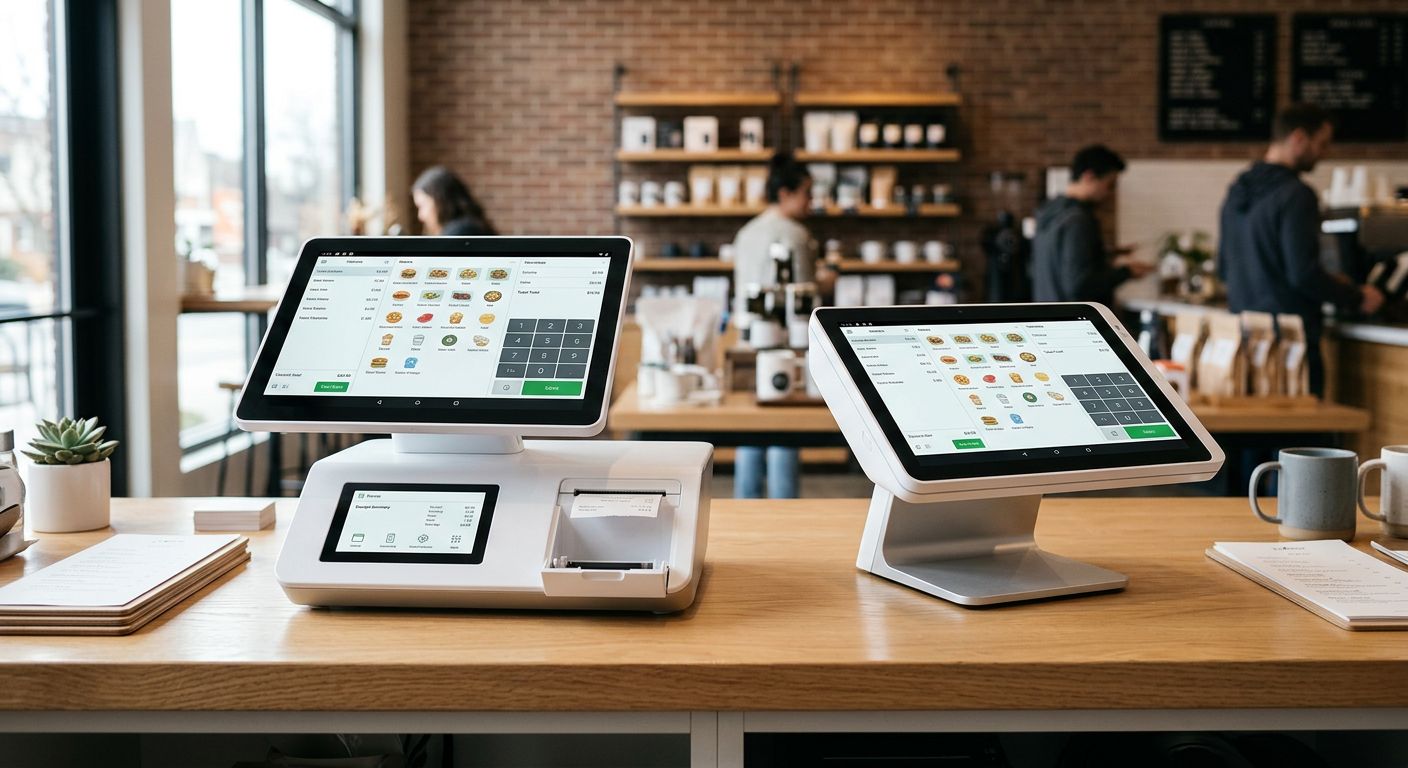
When comparing the clover station duo vs solo, we look at the physical design each brings to your payment processing setup. The Clover Station POS system is available in both configurations to suit different business environments. The Duo model features a dual-display—a large merchant-facing screen paired with a customer-facing display—and includes a built-in thermal receipt printer, making it an all-in-one solution ideal for busier counters. The Solo offers a single-display, more compact footprint better suited for limited counter space, with an optional external printer. Both terminals support EMV chip, NFC contactless, and magstripe payments and run on Android OS with standard WiFi and Ethernet connectivity. For high-traffic locations needing full features in one unit, the Duo is your go-to. For tighter spaces, the Solo keeps things streamlined. As your partner for better payment processing, we provide competitive rates and no cancellation fee—qualifying merchants may even receive free hardware placement.
1. Duo vs Solo: Key Differences
When deciding between the Clover station Duo vs Solo, the key differences lie in form factor, display, and connectivity. The Clover Duo POS system is a countertop terminal featuring an integrated receipt printer and a large color touchscreen, making it ideal for high-volume retail counters and full-service restaurant environments. By contrast, the Clover Solo is a compact, handheld device with a smaller, streamlined display, purpose-built for mobile payments, pop-up venues, and businesses where counter space is at a premium.
The comparison between the Clover Duo and Solo also highlights connectivity: the Duo relies on Ethernet for a wired, dependable connection, while the Solo operates over Wi-Fi with optional cellular capability for true on-the-go mobility. Both systems are available through us at competitive pricing, and qualifying merchants may receive free or discounted hardware placements — subject to eligibility requirements.

Visual comparison of Clover Duo and Solo POS hardware features.
Ultimately, the choice depends on whether your business prioritizes stationary functionality or portable mobility, and we are here to help you determine which system aligns with your operational needs.
2. Customer-Facing Display Benefits
When evaluating the Clover Station Duo vs Solo, one key differentiator is the dedicated customer-facing display on the Duo. The Clover Duo 2023 features a dedicated 10.1-inch customer-facing screen separate from the 7-inch merchant display, according to product details from our catalog. This dual-screen approach can increase transparency by allowing customers to review their order, confirm the amount, and select a tip directly before finalizing, which helps reduce transaction errors and builds trust. The display can also present promotional content or loyalty prompts, encouraging upsells without requiring staff to intervene.
The Clover Station’s large, adjustable 14-inch merchant display and integrated 7-inch customer-facing touchscreen can be positioned to face customers, providing a clear view of transaction details and enabling self-service actions like tapping or signing. For businesses comparing the Duo and Solo models, this dual-screen benefit speeds up checkout because customers confirm or sign directly without handing the device to the merchant. Other models, such as the Clover Mini POS system also offer a customer-facing display, giving businesses flexible options to match their needs. We have seen that this level of interaction can improve customer satisfaction and operational efficiency.
3. Workspace Requirements Compared
When comparing the clover station duo vs solo, the workspace requirements differ significantly. The Clover Duo 2023, as detailed by The POS Brokers, features a 6.9-inch display and a separate base unit that must sit on a countertop, with an attached card reader that extends the overall footprint. This setup demands a dedicated surface area near a standard AC power outlet, as it uses a 100–240V adapter.
The Clover Solo POS New 2023, in contrast, is a compact, standalone unit with a 3.5-inch screen that requires far less counter space. It is powered by a USB‑C connection, which makes it easier to position wherever a USB‑C power source is available. For businesses with tight counters, the workspace setup for the clover station duo vs solo can directly influence your layout decisions.
Both devices need reliable internet connectivity via Ethernet or Wi‑Fi (802.11a/b/g/n/ac), and the workspace must be within reach of a power outlet and network connection. If you plan to add peripherals like a printer or barcode scanner, plan for additional room and ports. Remember that a merchant must qualify for free or discounted hardware placement. If your workspace requires a different setup, consider SDL POS POS hardware as an alternative.
4. Best Terminal for Counter-Service
For quick-service restaurants, the clover station duo vs solo comparison often misses the key question: which terminal form factor works best at your counter? At The POS Brokers, we offer both the Clover Station and Clover Mini for counter-service setups.
The Clover Station is our full-size recommendation. When you consider the Duo and Solo differences, the Station Duo model includes a 14-inch touchscreen, a 7-inch customer display, and an integrated receipt printer with cash drawer. Its Ethernet connectivity handles high order volumes efficiently—making it ideal for busy counters.
The Clover Mini packs the same Clover software into a compact design perfect for limited counter space. It still accepts all major payment types, including contactless and mobile wallets, and integrates with QuickBooks and other apps.
While both terminals excel in counter-service, businesses with high-volume needs may also consider alternatives like the Quantic POS system. Both Clover models can be provided with free hardware placement (subject to qualification). Contact us, your partner for better payment processing, to confirm which terminal qualifies and to get pricing.
5. Transaction Fee Comparisons
Beyond hardware, transaction fees are another crucial factor when selecting a POS system. For businesses evaluating alternatives like TCang POS systems, the pricing structures differ significantly.
- Clover Go vs. Square: Both charge 2.6% + $0.10 per swipe, but Clover Go provides free hardware placements for qualifying merchants and access to cash discount programs — advantages that Square does not offer. Plus, with our Clover Go, you get dedicated account support and next-day deposits, making it a superior value for small businesses.
- Clover Station Duo vs Solo: Both models share a 2.6% + $0.10 fee with no monthly charges. While Solo is perfect for retail and counter-service, the Duo’s dual-screen and enhanced terminal features may increase total costs slightly. We offer no setup or cancellation fees on Clover placements, making them a cost-effective, transparent option. For businesses requiring a different fee structure, TCang POS systems provide an alternative.
We’re your partner for better payment processing. Get the best credit card processing solutions for your business today.
6. Exploring the Clover Family Options
Our Clover family includes several versatile models designed to fit different business needs. Whether you’re comparing the Clover Station Duo vs Solo for a high-volume countertop setup or need a portable solution like the Clover Mini, we have options to match your operation. Below is a quick overview of the Clover models available through The POS Brokers:
- Clover Mini: A compact, all-in-one countertop POS that processes credit, debit, EMV, and contactless payments, with QuickBooks integration and inventory tracking. Suitable for small to medium businesses.
- Clover Flex: A handheld mobile terminal for on-the-go payments, ideal for tableside service or mobile vendors, accepting Apple Pay, Google Pay, and NFC.
- Clover Station: The full-service countertop system, available as the dual-screen Duo for customer-facing interactions or the single-screen Solo for a streamlined setup, both engineered for high-volume environments.
To see all Clover models and other POS systems, visit our shop page. Our advisors can help you select the ideal Clover model for your specific industry and transaction volume—contact us today. Qualifying merchants may receive free or discounted hardware; reach out to our team to check your eligibility.
7. Choosing Based on Business Type
Beyond general features, your business type is the single most important factor when you select a POS system for your business type. We work with solutions that are purpose-built for different operational models, so the right fit depends on how you serve your customers every day.
For full-service restaurants, table management, server assignment, and split payments are essential. The Clover Station is ideal for these environments because it provides advanced tools and automated technology that keep the front of house organized. For counter-service restaurants, speed is everything. SDL POS is well-suited to this workflow, with a design focused on fast order entry and reliable payment processing.
Retail stores need strong inventory management and barcode scanning, and both systems support these features effectively. Our team also supports mobile businesses that require portable, wireless POS solutions, as well as e‑commerce operations that need integrated payment gateways. We are your partner for better payment processing, helping you match your POS to your business model without the guesswork.
Contact us to discuss which POS system fits your business type. We offer free consultations and can walk you through qualification for our hardware placement programs.
8. Free Clover Placements Available
When comparing the Clover Station Duo vs Solo, both powerful devices are available as free Clover placements through our team at The POS Brokers. We understand that upgrading your point-of-sale system is a significant decision, and we are committed to helping you get the best hardware with minimal upfront cost. The Clover Station Duo features a dual-screen setup ideal for high-volume businesses, while the compact Clover Station Solo offers a streamlined all-in-one countertop solution.
Free Clover placements are not guaranteed but are offered to merchants who meet specific qualification criteria. During the application process, we review factors such as processing history and expected transaction volume to determine eligibility. Merchant must qualify for free or discounted hardware. This simple step ensures we can match you with the best solution for your needs. If you are ready to explore your options, contact us today to start the qualification process and discover which Clover system will elevate your business.
Choosing Between Duo and Solo
When you compare the Duo and Solo, the hardware differences are clear. The Clover Duo uses a dual-display layout with a 7-inch main touchscreen and a 2.3-inch customer-facing screen for signatures, tips, and promotions. The Clover Solo keeps things compact with a single 7-inch touchscreen in a one-piece design.
- Dual screens (Duo) versus single screen (Solo)
- Customer-facing screen included only on Duo
- Full-service restaurants benefit most from the Duo
- Retail, quick-service, and mobile setups suit the Solo
- Both run the same full Clover POS software ecosystem
- Duo typically costs more at retail, but we help qualifying merchants access free or discounted hardware for each model
Now that you see how the two terminals compare in form and function, the next section walks through setup details and complete pricing for each model.
Resources
- Qualify for Free Clover Duo 2026 POS System
- Get Free Clover Station POS System with KDS
- Get Free Clover Mini POS System with QuickBooks
- Compare Clover Go and Square Card Reader Solutions
- Get Free Clover Solo POS System and Zero Cost Processing
- Browse Clover POS Systems and Free Hardware Offers
- Discover Clover POS with Self-Ordering Kiosk and KDS
- Explore SDLPOS POS Hardware with Custom Configurations
- Get Quantic Cloud POS with No Binding Contracts
- Get Custom POS Systems from TCANG with OEM Services
- Explore Aonpos All-in-One POS Systems and Peripherals