Table of Contents
- How to Integrate POS Hardware with an Existing Merchant Account
- Before You Begin: Prerequisites for POS Integration
- Step 1: Verify Your Existing Merchant Account Compatibility
- Step 2: Choose Compatible POS Hardware
- Step 3: Complete EMV Certification for Your Merchant Account
- Step 4: Connect Your POS Terminal to the Payment Processor
How to Integrate POS Hardware with an Existing Merchant Account
Modernizing your checkout experience doesn’t require switching your merchant service provider. This guide will help you navigate the process of connecting new hardware to your backend processing accounts.
Before You Begin: Prerequisites for POS Integration
Preparing to integrate POS hardware with an existing merchant account requires a clear understanding of essential prerequisites to avoid payment terminal connectivity issues and operational delays. We recommend verifying the following requirements before proceeding.
- Active Merchant Account — Ensure your merchant account supports the desired POS system. EMV certification for merchant accounts is typically required for secure transaction processing and may need verification before integration begins.
- Hardware Compatibility — Confirm your payment terminal is not locked to another provider and can be reprogrammed. Many POS systems now include embedded payments, allowing merchants to process transactions without additional hardware.
- Network Connectivity — A stable Wi-Fi or Ethernet connection is necessary for real-time transaction processing and software updates. For wireless terminals, verify adequate signal strength at the point of sale. Test payment flows and updates during off-hours to avoid disruptions and minimize impact on customers.
- Multi-Location Setup — For businesses with multiple locations, each register requires its own terminal and dedicated network configuration.
Once these prerequisites are met, proceed to the step-by-step integration guide. Your partner for better payment processing.
Step 1: Verify Your Existing Merchant Account Compatibility
Before you integrate new POS hardware into your operations, the very first step is to confirm that your existing merchant account is compatible. This proactive check helps you avoid unexpected payment terminal connectivity issues and ensures a smooth transition.
To begin, we recommend verifying your account type with your current processor and confirming its EMV certification for merchant accounts. According to industry standards set by the Smart Payment Association, a properly certified account is essential for secure chip-card transactions on modern terminals. This step directly impacts your ability to process payments seamlessly.
We advise contacting your processor directly to ask if your account supports the specific POS hardware you intend to deploy. If you find the process technical, we at ThePOS Brokers can help verify your account details when you reach out to our team. Verifying your account compatibility is essential for businesses that want to enable omnichannel payments across in-store and online channels. Once compatibility is confirmed, you are ready to proceed to the next stage of your integration journey.
Step 2: Choose Compatible POS Hardware
Once you understand your processing environment, the next step is to verify that the hardware you select will integrate POS hardware with your existing merchant account. Not all terminals are universally compatible, so we recommend confirming that your chosen device is supported by your processor before making any purchase.
EMV certification is a critical factor. To accept chip card transactions, your hardware must be EMV certified for your specific merchant account and acquirer. Without this certification, you risk payment terminal connectivity issues that can lead to declined transactions and frustrated customers.
PCI compliance is another mandatory security baseline. Every device you use for payment processing must meet the data security standards set by the PCI Security Standards Council. This ensures that cardholder information is protected at the point of interaction.
We also advise against assuming hardware interchangeability. Terminals designed for one processing platform may not function on another, so always consult compatibility lists or processor-specific guidance. For validated hardware models that support cross-platform use, we suggest checking Smart Payment Association resources to confirm terminal certification status and firmware update policies before you buy.
Step 3: Complete EMV Certification for Your Merchant Account
One of the most critical milestones when you integrate POS hardware with an existing merchant account is completing the certification that validates secure chip card acceptance. This process, known as emv certification for merchant accounts, confirms that your payment terminal and software meet the technical specifications established by EMVCo, the global industry body that defines these standards. Without this approval, your hardware cannot process EMV transactions, leaving your business exposed to higher fraud liability.
The certification process typically involves submitting your terminal configuration files to your payment processor, followed by a series of test transactions that mirror real-world scenarios. Your processor runs these transactions against EMVCo-approved test cases to verify that every chip card interaction—insertion, authentication, and data exchange—functions correctly. While EMV certification follows EMVCo standards, maintaining ongoing compliance with the PCI Security Standards Council is also required, as EMV technology complements PCI DSS but does not replace its security requirements. This step also helps address potential payment terminal connectivity issues before they surface in a live environment.
We help coordinate this paperwork-intensive stage with your processor and acquiring bank, ensuring that certification is tailored to your specific merchant account and POS system combination. The typical timeline ranges from a few days to a couple of weeks. After certification, you will be ready to integrate your terminal and begin live testing.
Step 4: Connect Your POS Terminal to the Payment Processor
Once your merchant account is active and you have received your terminal, the next step is to connect it to your payment processor. We will guide you through configuring your device so you can integrate POS hardware with existing merchant account credentials securely and efficiently.
First, connect the terminal to a power source and then to the internet. We recommend a stable wired Ethernet connection for maximum reliability. Navigate to the terminal’s settings menu to locate the network configuration section and either plug in the Ethernet cable or enter your Wi-Fi password.
Next, access the terminal’s communication or host settings area. Enter the merchant ID, terminal ID, and processor URL exactly as provided in your merchant account setup email. If prompted for a port or encryption type, use the values supplied by your processor. Common defaults are port 8080 or 443 with TLS 1.2.
Verify that your terminal meets the latest EMV specifications to stay compliant and avoid chargeback liability. EMV certification for merchant accounts is essential for secure transaction processing.
Finally, run a $1.00 test transaction using a test card or the terminal’s diagnostic mode. This confirms connectivity and authorization before you process live sales. If the test fails, common payment terminal connectivity issues include network timeouts or incorrect server addresses. Should problems persist, we recommend contacting The POS Brokers support team for assistance.
Remind yourself that if your terminal was provided as a free or discounted placement, eligibility requirements apply per your agreement. Once your test transaction processes successfully, your terminal is ready for live processing. Proceed to Step 5 for go-live procedures.
Step 5: Configure Payment Processing Settings
Once your POS terminal is physically connected, the next step is to integrate POS hardware with your existing merchant account. We guide you through entering your processor details, such as your merchant ID and terminal ID, to establish the connection. Next, you will configure accepted payment types, including credit and debit cards, EMV chip, and contactless (NFC) methods like mobile wallets. If your terminal requires EMV certification for merchant accounts, our team can assist with the certification process to ensure compliance. You should also set transaction preferences for tip adjustment, receipt options, tax calculation, and batch settlement timing. Should you encounter payment terminal connectivity issues, check your network and Wi-Fi settings as a first troubleshooting step. According to our internal guidance, once configured, you can access daily sales summaries and transaction logs. After these settings are in place, you’re ready to test a transaction to confirm everything works.
Step 6: Test Transactions and Resolve Integration Issues
Once you integrate POS hardware with your existing merchant account, the next critical phase is verifying everything works with real transactions. We recommend running a small $1 test transaction using a chip card to confirm end-to-end processing between your terminal and payment gateway. Immediately void or refund the test to avoid unintended charges.
If the test fails, first check your terminal’s network connection. Common issues include payment terminal connectivity issues such as weak Wi‑Fi signals or loose Ethernet cables, and EMV certification for merchant accounts failing when chip cards aren’t recognized. Other integration errors may include slow response times, partial approvals, or the terminal not pairing with your processor.
For persistent problems requiring deeper troubleshooting, our support team at The POS Brokers is ready to help. Once your terminal processes a successful test and the transaction appears correctly in your merchant dashboard, your system is ready for live deployment—covered in the next step.
Step 7: Finalize and Go Live with Your Integrated System
When you are ready to integrate POS hardware with an existing merchant account, the final validation phase ensures everything works seamlessly before you open for business. According to POS Brokers, all foundational prerequisites—including merchant account setup and equipment configuration—must be confirmed before testing and activation.
- Verify all payment terminals are correctly paired with your merchant account and run a live test transaction to confirm processing and settlement occurs within the expected timeframe.
- Confirm EMV certification for merchant accounts is active to avoid declines on chip transactions and maintain compliance.
- Address common payment terminal connectivity issues by checking network configuration settings and updating firmware to the latest version.
- Update internal systems like inventory management and employee logs to reflect the new integration and maintain operational continuity.
We are here to help. If you encounter errors or connectivity problems, contact our support team for post-launch assistance.
Troubleshooting Common POS Integration Issues
Even with careful setup, you may occasionally run into integration issues. When you integrate POS hardware with an existing merchant account, the most common challenges involve connectivity, certification, and configuration. Here are the ones we see most often and how to resolve them.
Payment Terminal Connectivity Issues
One of the most frequent hurdles is the terminal failing to pair with your merchant account. This often stems from incorrect API keys or terminal IDs. We recommend a simple three-step check: first, verify that the terminal ID in your POS software matches the one assigned to your merchant account. Second, confirm that the API key is entered correctly and hasn’t expired. Third, restart the terminal to re-establish the connection. Many hardware-to-account connection problems resolve at this stage.
If you still see a “no communication” error, check your network firewall settings. The terminal needs outbound access on certain ports—port 443 for TLS is a common requirement. We also suggest testing with a direct Ethernet connection before calling support to rule out Wi-Fi interference.
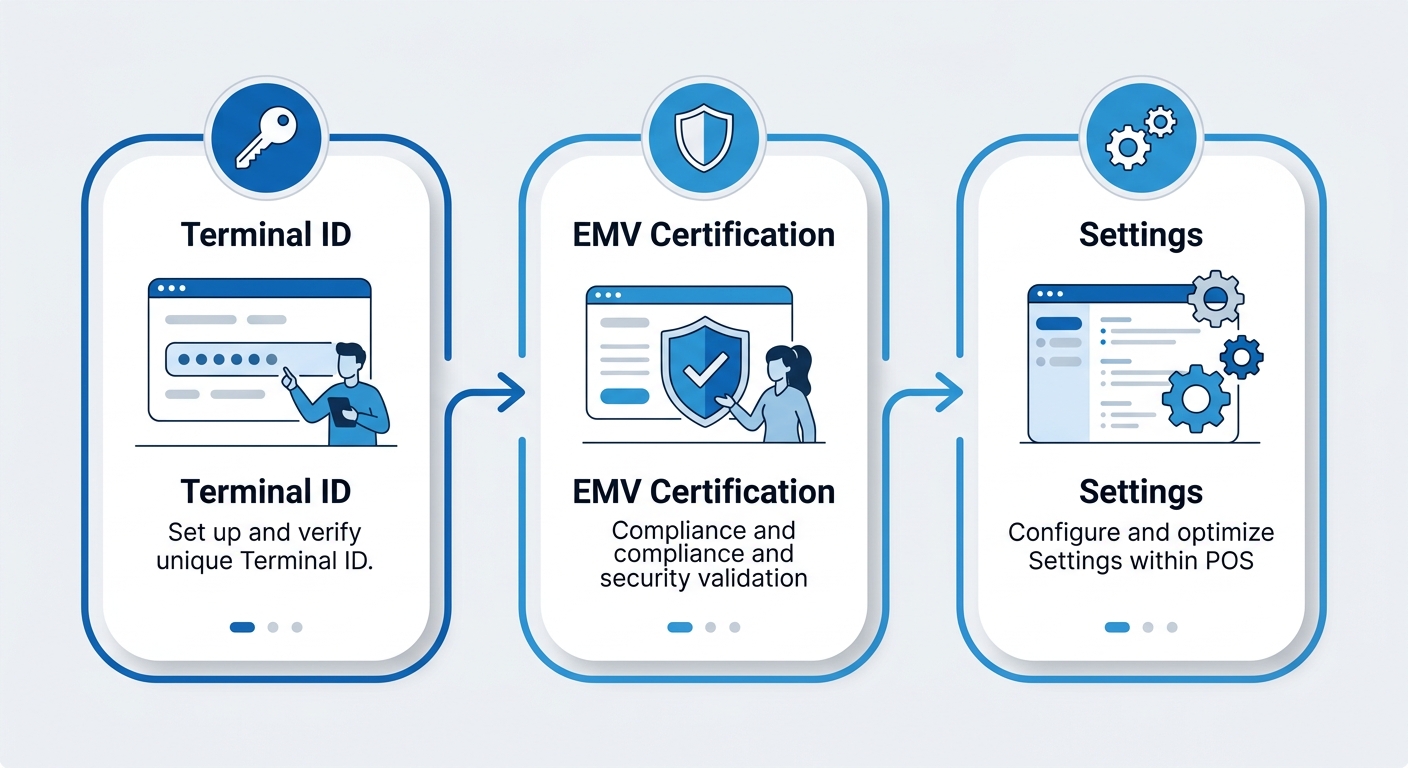
Three-step troubleshooting flow for POS integration issues.
EMV Certification for Merchant Accounts
New or swapped terminals frequently require EMV certification for merchant accounts before they can process chip-card transactions. Delays typically occur when the merchant application is incomplete or when the processor is experiencing a backlog. This certification approval process is mandatory in the United States and cannot be bypassed. If your terminal has been pending for what feels like too long, our support team can check the status and often expedite it for you.
Merchant Account Setting Mismatches
A “transaction declined” message after integration often points to a mismatch between your POS software and your merchant account profile. Two areas deserve immediate attention: the Merchant Category Code (MCC) assigned to your account and the funding profile that governs transaction settlement. Cross-checking these values in your merchant portal against what your POS software expects usually identifies the transaction reporting mismatch.
Once these integration hurdles are cleared, your system will process payments smoothly. Next, we’ll cover ways to optimize your transaction reporting.
Seamless Payment Processing Starts Here
Getting a new POS system doesn’t mean you have to start over with a new payment processor. We help businesses integrate POS hardware with their existing merchant account, keeping their current processing relationship intact while upgrading the technology that runs daily transactions. By connecting your POS hardware directly to the account you already have, you can avoid the delays and paperwork of a new merchant application.
That tight connection also reduces common payment terminal connectivity issues because the payment flow stays inside a single unified environment instead of bouncing between separate services. Many of our clients also appreciate that their EMV certification for merchant accounts remains active. Because they continue using an already-certified account, they avoid the time and expense of re-certifying hardware from scratch, which helps speed up deployment while keeping compliance obligations simple.
When you work with us, your processing setup stays in place and your hardware gets a meaningful upgrade without the typical headaches of switching providers. Our team handles the integration so you can start accepting payments on day one with minimal downtime.
Resources
- Get Merchant Services Provider for Online and In-Store Payments
- Discover Embedded Payments for Frictionless Checkout
- Learn About Omnichannel Payments to Reduce Cart Abandonment
- Discover 2026 Trends in Omnichannel Payments
- Learn About Omnichannel POS for Unified Transactions
- Get a Step-by-Step Guide to Omnichannel Payments
- Reduce Cart Abandonment with Omnichannel Payment Systems
- Discover Smart Payment Association Resources and Membership
- Access PCI Security Standards Council Resources for Compliance
- Discover EMV Specifications and Product Certification
- Access CFPB Resources for Consumer Financial Education
- Explore U.S. Payments Forum Resources on Payment Technology